Every time a client orders a Hetzner VPS, somebody on your team logs into the Hetzner Cloud console, spins up the instance by hand, copies the IP back into a support ticket, and hopes they picked the right location. Do that fifteen times a week and it stops being a task — it becomes your job.
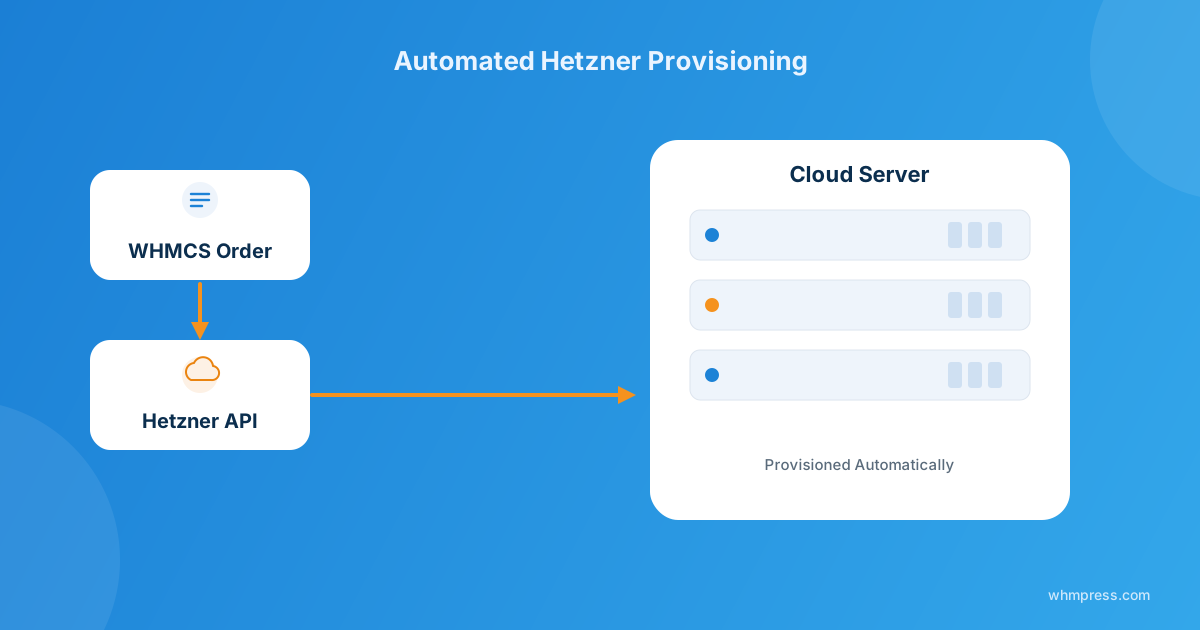
The Hetzner Cloud Server Module for WHMCS automates the entire lifecycle — order, provision, power controls, rebuild, backups, console access — by talking to Hetzner’s API directly from your WHMCS product. Clients self-serve from their client area; you stop touching the Hetzner console for routine orders.
Why hosts keep picking Hetzner for cloud servers
Hetzner’s cloud pricing is hard to argue with, and its API is clean enough that building real automation on top of it is genuinely straightforward — which is exactly why so many WHMCS-based hosts and resellers build their VPS lineup around it. The catch isn’t Hetzner. It’s what happens on your side of the order form once the invoice gets paid.
What manual provisioning actually costs you
I’ve watched this play out at more than one support desk: an order comes in at 11pm, the client expects their server “instantly” because that’s what the product page promised, and nobody’s awake to create it in the Hetzner console until morning. Multiply that by every reboot request, every “can you reset my root password” ticket, every OS reinstall — and your support queue fills up with work a script should be doing.
None of that is a knock on your team. It’s just what happens when a cloud provider’s automation stops at the API layer and your billing system doesn’t pick it up from there.
What the module actually automates
Based on what’s documented on the product page, here’s what moves from “manual ticket” to “self-service” once it’s installed:
On the admin side
- Create, suspend, unsuspend, and terminate servers straight from the WHMCS admin area
- Configure product-level defaults: location, data center, OS image, and server type
- Control exactly which actions are exposed in the client area
- Set usage quotas and resource limits per product
- Run custom cloud-init, bash, or shell scripts at instance creation
- Enable module logging for troubleshooting
- Sync pricing automatically from the Hetzner API so quotes never go stale
On the client side
- Power on/off, shut down, and reboot the server
- Reset the root password without opening a ticket
- Restore from automatic backups
- Mount and unmount ISO images
- Rebuild the server from any available OS image
- Enable backup functionality on their own instance
- View hostname, status, primary IP, and full IPv4/IPv6 address list
- Access the server through KVM console and VNC
OS coverage is wide — over 40 Linux distributions and application images (AlmaLinux, Debian, Ubuntu, Docker, GitLab, Nextcloud, pfSense, and more) plus Windows Server 2012 R2 through 2022. Configurable options extend to location, console access, snapshots, volumes, and IPv4/IPv6 addressing, with Auto Backups and additional volume storage available as add-ons.
Setting it up in WHMCS
- Generate an API token for the relevant project in your Hetzner Cloud console.
- Install the module files and license key into your WHMCS installation (requires ionCube Loader v13 or later).
- Create a new product, select the Hetzner module, and paste in the API token.
- Map your configurable options — location, server type, OS image, backups, volumes — to what you actually want clients choosing at checkout.
- Place a test order end-to-end before pointing real traffic at the product, so you catch any pricing or image mismatches early.
The module supports WHMCS 8.7 through 9.0.3, runs on PHP 8.1 through 8.4, and its client-area UI matches the Six, Twenty-One, and Lagom themes in both light and dark mode — so it won’t look bolted-on next to the rest of your client area.
Manual vs. automated: what actually changes
| Task | Manual (Hetzner console) | Automated (WHMCS module) |
|---|---|---|
| New server on order | Admin creates it by hand after payment clears | Provisions automatically once the invoice is paid |
| Reboot / power cycle | Support ticket → admin logs in → does it | Client clicks it in their WHMCS client area |
| Root password reset | Ticket, verification, manual reset | Self-service, no ticket needed |
| OS reinstall | Admin rebuilds from Hetzner console | Client rebuilds from available images |
| Pricing accuracy | Manually updated when Hetzner changes rates | Synced automatically from the Hetzner API |
Pricing tiers, and which one actually makes sense
The module is sold as a $5/month subscription (with a 14-day trial) or $29/year, which is the cheapest way to try it without committing. There’s also a $199 one-time lifetime license and a $149 one-time open-source edition that includes six months of support. If you’re running one or two Hetzner products, the monthly plan is the low-risk option; if Hetzner provisioning is a core part of your catalog, the lifetime license pays for itself within a year against the subscription.
Worth noting: the open-source one-time purchase carries no refund, so it’s worth running the trial on the subscription plan first if you’re not sure the fit is right.
If your setup needs something the stock module doesn’t cover — a non-standard billing rule, a custom client-area workflow, tighter integration with another system — that’s exactly the kind of gap our Custom WHMCS Development team fills, building on top of the same API-driven approach.
If Hetzner isn’t your only cloud provider
Plenty of hosts run a multi-cloud lineup rather than betting on one provider. If you’re also offering Vultr or DigitalOcean alongside Hetzner, the same automation logic applies to each — order-time provisioning, client-area power controls, and API-synced pricing — so clients get a consistent self-service experience no matter which backend actually spins up their server. You can browse the rest of the WHMCS module catalog for the other providers you run.
Frequently asked questions
Does the module keep pricing in sync with Hetzner automatically?
Yes — pricing syncs from the Hetzner API, including automatic daily re-syncing when Hetzner updates its rates, so you’re not quoting stale prices to clients.
Can clients reinstall the OS themselves?
Yes. Clients can rebuild their server from any of the available OS images directly in the client area, without filing a ticket.
Do I need anything special installed on my WHMCS server to run this?
Yes — the module requires ionCube Loader v13 or later, and supports WHMCS versions 8.7 through 9.0.3 on PHP 8.1 through 8.4.
I already have Hetzner servers running outside WHMCS — can I bring them in?
The module is built around order-time provisioning, so bringing an existing server under WHMCS billing generally means creating a matching product and recreating the service record to line up with the server’s current specs, rather than an automatic import.
The bottom line
If you’re still creating Hetzner servers by hand after every order, you’re doing the API’s job manually. The module doesn’t change what Hetzner offers — it just puts a self-service layer on top so clients get their server instantly and your team stops being the bottleneck between “paid invoice” and “running instance.”
Get order-to-server automation, client-area power controls, and API-synced pricing running on your Hetzner products today — or talk to us about a custom build if your setup needs more.
Get the Hetzner Cloud ModuleHetzner Cloud Server Module
Automated VPS Provisioning
Let clients order, manage, and rebuild Hetzner Cloud servers straight from their WHMCS client area — no manual console work.
Get the Module View product details →Custom WHMCS Development
Bespoke Modules & Integrations
Need a module, gateway, or integration built around how your business runs? We build upgrade-safe, API-driven WHMCS solutions.
Get a Free Quote View services →