
Cpanel Extended Module Servers For WHMCS By WHMPRESS
- 15+
- V.1.0.0
- WHMCS V.9.0.4
- PHP 8.3
- 6 Months of premium support are included.
- Free module updates for 6 Months included.
- Upgrade Easily to the Open Source Version with One Click
- Exclusive Access to Premium Deals
- Request a Free Development License
- Enable or disable module logs
- User-Friendly Interface
- Cost Efficiency
- Competitive Advantage
- Access To Premium Offers
- Compatible with WHMCS 9.0.4
- We will provide free installation and configuration of the module directly on your environment, ensuring it’s fully set up and ready to use all at no additional cost.
- 6 Months of premium support are included.
- Free module updates for 6 Months included.
- Upgrade Easily to the Open Source Version with One Click
- Exclusive Access to Premium Deals
- Request a Free Development License
- Enable or disable module logs
- User-Friendly Interface
- Cost Efficiency
- Competitive Advantage
- Access To Premium Offers
- Compatible with WHMCS 9.0.4
- We will provide free installation and configuration of the module directly on your environment, ensuring it’s fully set up and ready to use all at no additional cost.
WHMPRESS Cpanel Extended Servers Module For WHMCS
Bring Full cPanel Control Panel Experience Directly Into WHMCS Client Area
Cpanel Extended is a powerful WHMCS server module that brings the full cPanel control panel experience directly into the WHMCS client area. Instead of redirecting clients to a separate cPanel login, this module exposes individual cPanel tools and features as clean, accessible shortcuts inside the client area sidebar, giving clients instant one-click access to the exact cPanel features they need without ever leaving WHMCS.
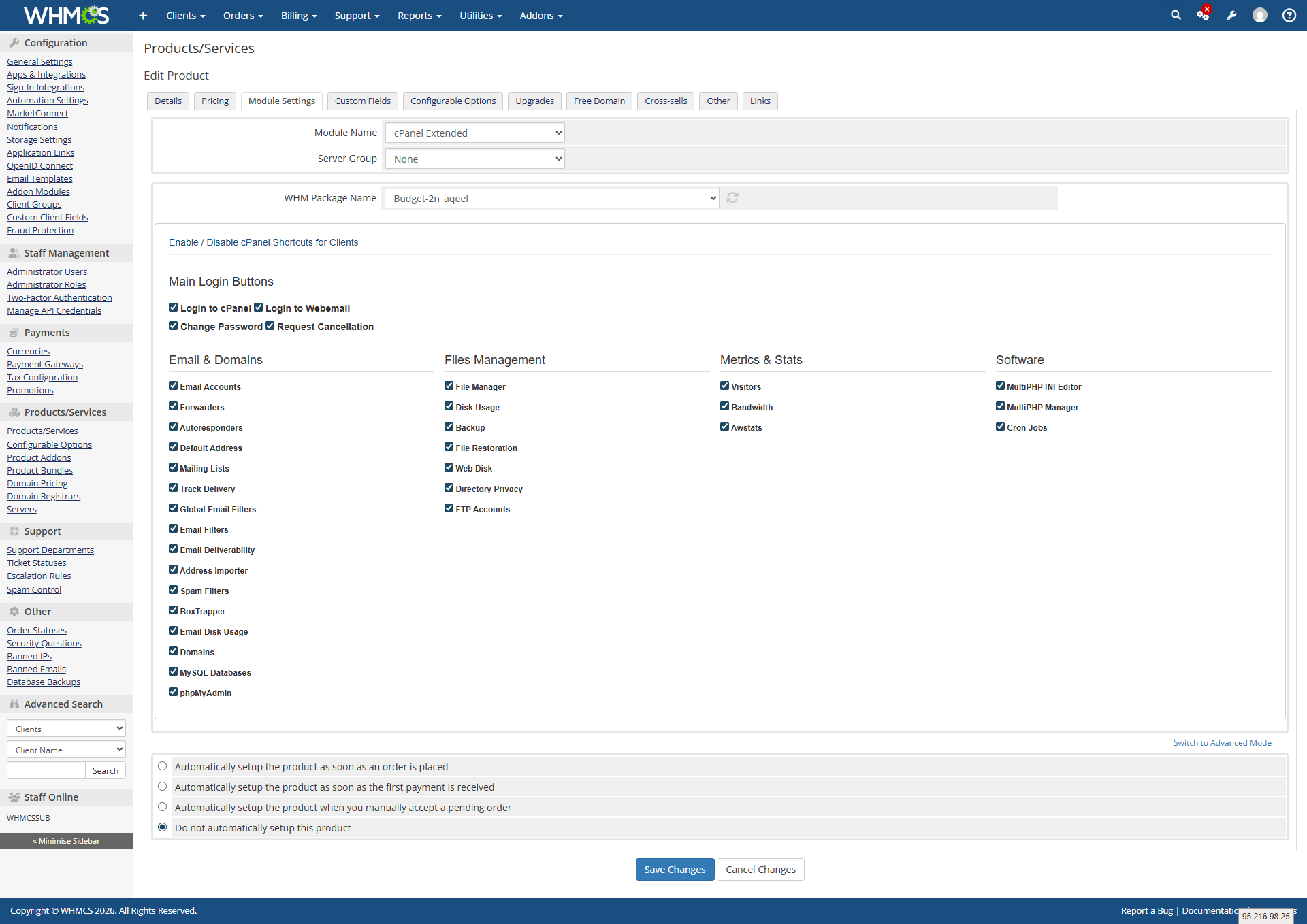
Administrators have complete control over which cPanel shortcuts are visible to each client. From the WHMCS admin product configuration panel, the super admin can enable or disable individual cPanel features per product using a simple checkbox system organized into clear categories — Email and Domains, Files Management, Metrics and Stats, and Software.
Clients see only the tools their plan allows. The sidebar in the client area displays each enabled cPanel feature as a clearly labeled button. Clicking any button takes the client directly into that specific cPanel section without requiring a separate login, providing a seamless and professional hosting management experience. Cpanel Extended Module by WHMPress is an alternative to cPanel modules by other developers, offering individual feature shortcuts, per-product controls, and seamless WHMCS integration.
Key Features of Cpanel Extended Server Module
Admin Module Settings
The module integrates directly into the WHMCS product configuration panel under Module Settings. Admins configure the module per product with the following options:
- Module Name set to cPanel Extended to activate the server module
- Server Group assign the server group connected to this product
- WHM Package Name select the WHM hosting package to link to this product from a dropdown of all available packages on the server
cPanel Shortcuts Control Panel:
- A full checkbox grid organized into four categories, allowing admins to enable or disable each individual cPanel feature per product
- Enabled features appear as clickable shortcuts in the client area sidebar for all clients on that product
- Disabled features are completely hidden from the client area
- Changes apply instantly on save with no module reload required
Email and Domains Category:
- Email Accounts: manage all email accounts on the hosting account
- Forwarders: set up email forwarding rules
- Autoresponders: configure automatic email reply messages
- Default Address: set the catch-all default email address
- Mailing Lists: create and manage mailing list subscriptions
- Track Delivery: monitor outgoing email delivery status
- Global Email Filters: set server-wide email filtering rules
- Email Filters: set per-account email filtering rules
- Email Deliverability: check and fix email authentication records
- Address Importer: bulk import email accounts and forwarders
- Spam Filters: configure Apache SpamAssassin spam protection
- BoxTrapper: enable challenge-response spam protection
- Email Disk Usage: monitor disk space used by email accounts
- Domains: manage addon domains, subdomains, and aliases
- MySQL Databases: create and manage MySQL databases
- phpMyAdmin: access the phpMyAdmin database management interface
Files Management Category:
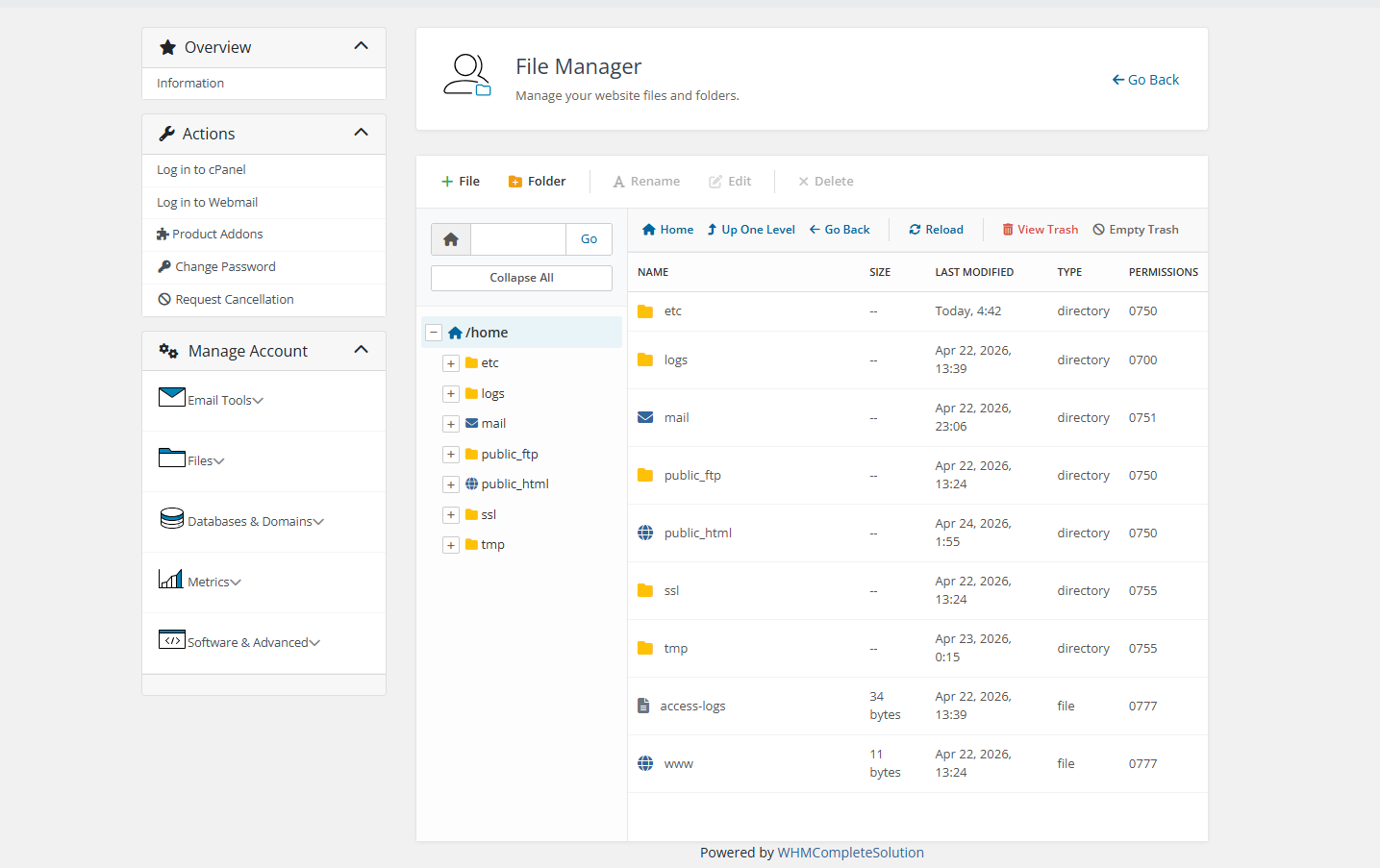
- File Manager: Access the full cPanel web-based file manager
- Disk Usage: View disk usage breakdown across the hosting account
- Backup: Create and download full or partial account backups
- File Restoration: Restore files from previously created backups
- Web Disk configure WebDAV access to hosting files
- Directory Privacy: Password-protect directories on the account
- FTP Accounts: Create and manage FTP user accounts
Metrics and Stats Category:
- Visitors view detailed visitor logs for hosted websites
- Bandwidth monitor monthly bandwidth usage statistics
- Awstats provides advanced website traffic analytics via Awstats
Software and Advanced Category:
- MultiPHP Manager: switch PHP versions per domain or directory
- MultiPHP INI Editor: modify PHP configuration settings per domain
- Cron Jobs: create and manage scheduled cron job tasks
Client Area Extended cPanel Dashboard
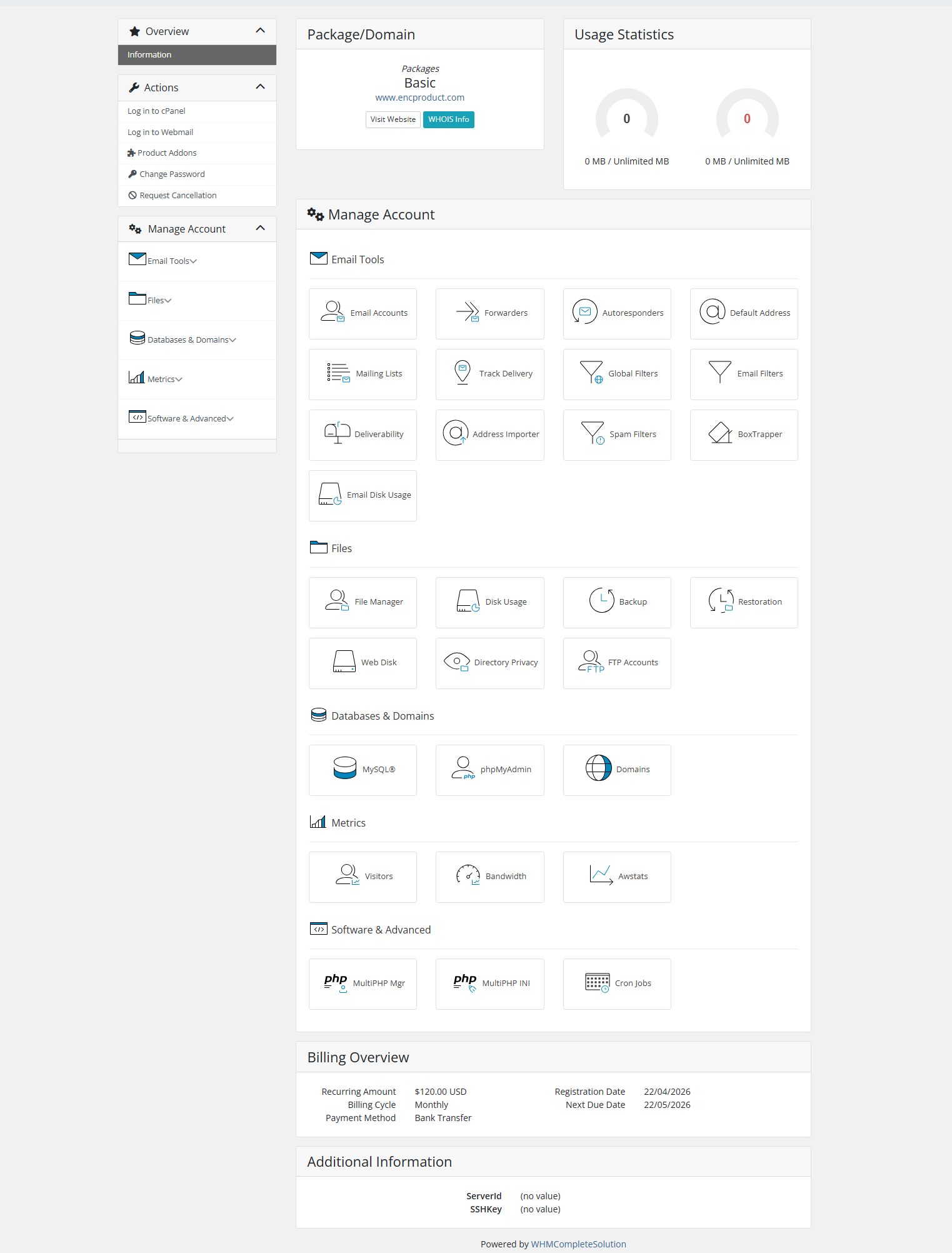
When a client clicks into their hosting service, they see a full Manage Account dashboard organized into clear sections matching the enabled features for their product.
Email Tools Section
- Email Accounts, Forwarders, Autoresponders, Default Address, Mailing Lists, Track Delivery, Global Filters, Email Filters, Deliverability, Address Importer, Spam Filters, BoxTrapper, and Email Disk Usage all displayed as icon cards with labels
Files Section:
- File Manager, Disk Usage, Backup, Restoration, Web Disk, Directory Privacy, FTP Accounts displayed as icon cards
Databases and Domains Section:
- MySQL, phpMyAdmin, Domains displayed as icon cards
Metrics Section:
- Visitors, Bandwidth, Awstats displayed as icon cards
Software and Advanced Section:
MultiPHP Manager, MultiPHP INI Editor, Cron Jobs icon cards
Each card displays a unique icon and the feature name
Clicking any card opens that cPanel tool directly
Dashboard layout is clean, organized, and professional
Only enabled features for the client’s product are displayed
Hidden features leave no gaps or empty placeholders in the layout
General Information:
WHMCS Versions: Fully compatible with versions 9.0.3 to 8.7
PHP Versions: Supports PHP 8.4, 8.3, 8.2, and 8.1
Themes Supported: Works with WHMCS themes such as Six, Twenty-One, and Lagom WHMCS Client Theme
System Requirement: Requires ionCube Loader v13 or later
Module Price
Monthly Price: 5$.
Annually Price: 29$.
OPEN-SOURCE VERSION: 249$ One Time Price.
Improved Client Experience:
- Seamless integration of cPanel hosting accounts with the WHMCS platform.
- Effortless management of cPanel features (Emails, Files, Databases, Domains, etc.) directly from the WHMCS client area.
- One-click Single Sign-On (SSO) support for instant, password-less access to cPanel and WHM.
- Advanced UI options allow clients to easily manage complex settings like Directory Privacy, BoxTrapper, and Email Filters.
- Built-in secure API communication ensuring safe data handling between WHMCS and cPanel.
- Clients can view real-time disk usage, bandwidth consumption, and other hosting metrics through interactive interfaces.
- Admins can easily control feature visibility and manage module settings directly from the WHMCS product configuration.
Per-Product Customized cPanel Access:
Scenario: A hosting business offers 3 plans: Basic, Professional, and Enterprise. Admin configures each product separately — Basic plan gets only Email Accounts and File Manager. Professional gets all Email + Files features. Enterprise gets everything including Metrics and Software tools.
Value: Sell higher-tier plans by offering more cPanel features. Clients only see what they paid for.
One-Click Email Account Management:
Scenario: A client needs to create a new email account for a team member. Instead of logging into cPanel separately, they go to WHMCS client area → click Email Accounts button from sidebar → instantly inside cPanel’s email section. Creates account in seconds.
Value: Seamless experience. Clients never ask “where do I log in?” again.
Self-Service Backup & Restore:
Scenario: A client accidentally deletes important files. Logs into WHMCS → clicks Backup button → creates a full backup. Then clicks File Restoration → restores deleted files instantly without contacting support.
Value: Zero support tickets for backup/restore requests. Clients fix mistakes themselves.
Easy PHP Version Management:
Scenario: A client installs a WordPress plugin that requires PHP 8.1. Goes to WHMCS client area → MultiPHP Manager button → switches PHP version for their domain in one click. No ticket, no waiting.
Value: Technical clients love control. Support team saves hours of “can you change my PHP version?” tickets.
Sign In to Review
Verify your WHMPRESS account credentials to leave a review.
Customer Reviews
No reviews yet. Be the first to share your experience!
No reviews match the selected filter.