
Kickstart 2026 with Flat 15% OFF on all our premium modules and services!

WHMPRESS Hetzner Cloud Servers For WHMCS is a powerful solution designed to streamline the automation of provisioning and managing Hetzner Cloud virtual machines. With a wide variety of customizable options, your clients can easily order servers tailored to their individual needs and preferences. No longer will your customers need to leave your WHMCS platform to monitor the status of their virtual instances, rebuild them with a selected operating system, or access the remote console. The client area is equipped with features to manage automatic backups, handle network subnets, and create machine snapshots within predefined size limits. Additionally, clients can choose from Hetzner’s available ISO images to mount on their servers. On your end, you have full control over the product features, allowing you to define which options will be available in the client area, provide custom scripts to be executed during instance creation, and select the options your customers will have access to—all with ease.

Cpanel Extended Module Servers For WHMCS By WHMPRESS

WHMPRESS Cpanel Extended Servers Module For WHMCS

Bring Full cPanel Control Panel Experience Directly Into WHMCS Client Area

Cpanel Extended is a powerful WHMCS server module that brings the full cPanel control panel experience directly into the WHMCS client area. Instead of redirecting clients to a separate cPanel login, this module exposes individual cPanel tools and features as clean, accessible shortcuts inside the client area sidebar, giving clients instant one-click access to the exact cPanel features they need without ever leaving WHMCS.

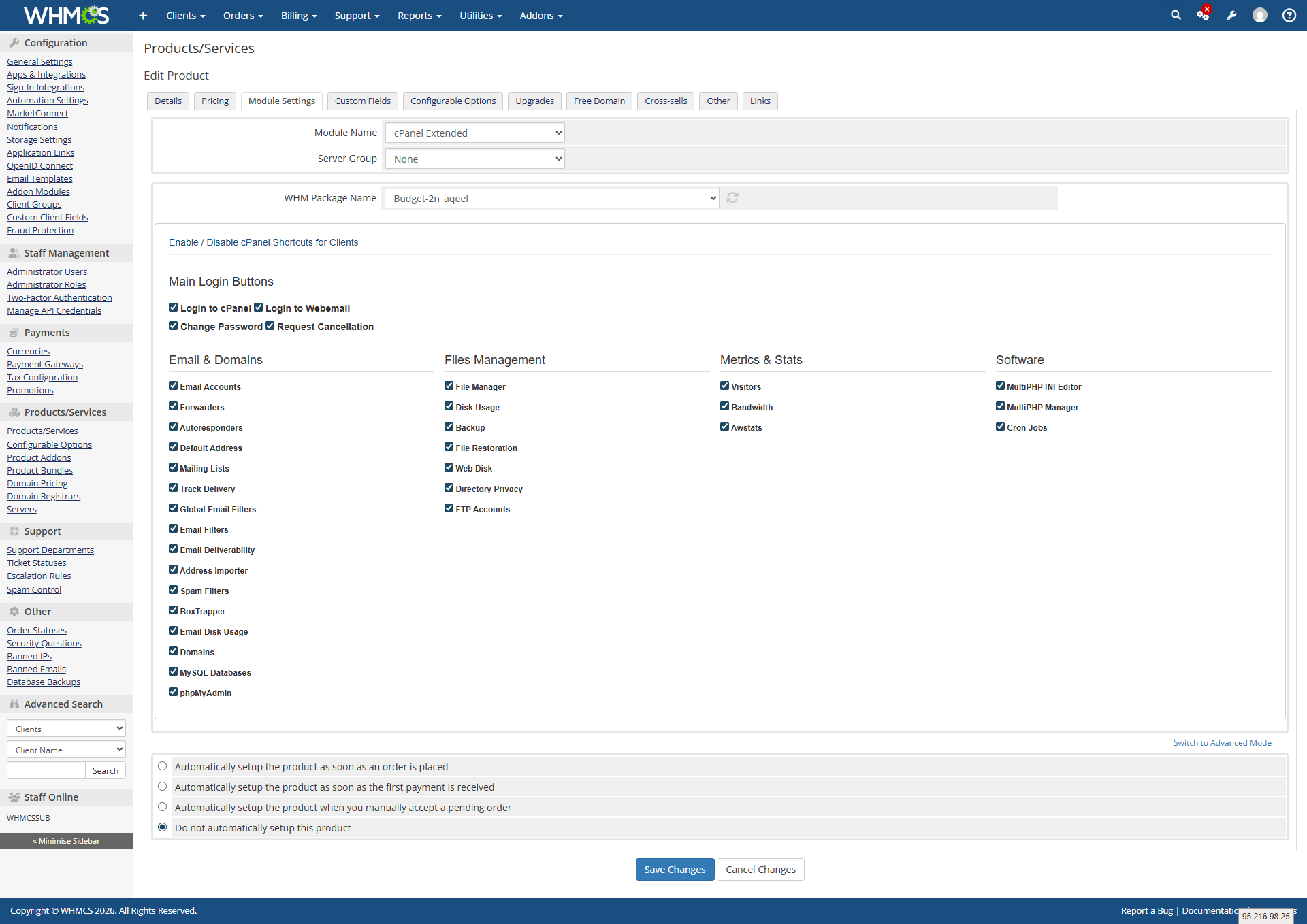
Administrators have complete control over which cPanel shortcuts are visible to each client. From the WHMCS admin product configuration panel, the super admin can enable or disable individual cPanel features per product using a simple checkbox system organized into clear categories — Email and Domains, Files Management, Metrics and Stats, and Software.

Clients see only the tools their plan allows. The sidebar in the client area displays each enabled cPanel feature as a clearly labeled button. Clicking any button takes the client directly into that specific cPanel section without requiring a separate login, providing a seamless and professional hosting management experience. Cpanel Extended Module by WHMPress is an alternative to cPanel modules by other developers, offering individual feature shortcuts, per-product controls, and seamless WHMCS integration.

Key Features of Cpanel Extended Server Module

Admin Module Settings
  • The module integrates directly into the WHMCS product configuration panel under Module Settings. Admins configure the module per product with the following options:

    • Module Name set to cPanel Extended to activate the server module
    • Server Group assign the server group connected to this product
    • WHM Package Name select the WHM hosting package to link to this product from a dropdown of all available packages on the server
  • A full checkbox grid organized into four categories, allowing admins to enable or disable each individual cPanel feature per product
  • Enabled features appear as clickable shortcuts in the client area sidebar for all clients on that product
  • Disabled features are completely hidden from the client area
  • Changes apply instantly on save with no module reload required
  •  
  • Email Accounts: manage all email accounts on the hosting account
  • Forwarders: set up email forwarding rules
  • Autoresponders: configure automatic email reply messages
  • Default Address: set the catch-all default email address
  • Mailing Lists: create and manage mailing list subscriptions
  • Track Delivery: monitor outgoing email delivery status
  • Global Email Filters: set server-wide email filtering rules
  • Email Filters: set per-account email filtering rules
  • Email Deliverability: check and fix email authentication records
  • Address Importer: bulk import email accounts and forwarders
  • Spam Filters: configure Apache SpamAssassin spam protection
  • BoxTrapper: enable challenge-response spam protection
  • Email Disk Usage: monitor disk space used by email accounts
  • Domains: manage addon domains, subdomains, and aliases
  • MySQL Databases: create and manage MySQL databases
  • phpMyAdmin: access the phpMyAdmin database management interface
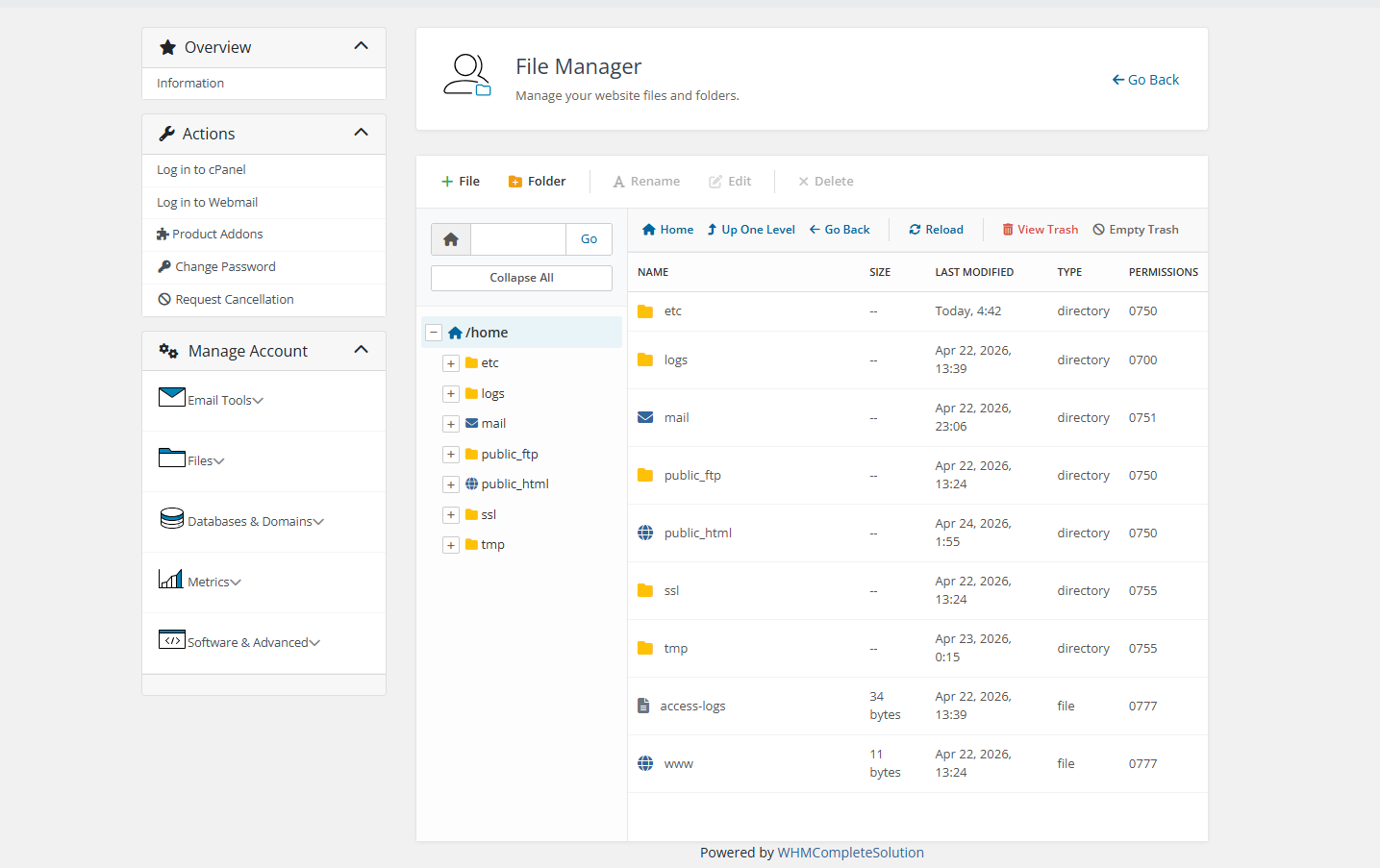
  • File Manager: Access the full cPanel web-based file manager
  • Disk Usage: View disk usage breakdown across the hosting account
  • Backup: Create and download full or partial account backups
  • File Restoration: Restore files from previously created backups
  • Web Disk configure WebDAV access to hosting files
  • Directory Privacy: Password-protect directories on the account
  • FTP Accounts: Create and manage FTP user accounts
  • Visitors view detailed visitor logs for hosted websites
  • Bandwidth monitor monthly bandwidth usage statistics
  • Awstats provides advanced website traffic analytics via Awstats
  •  
  • MultiPHP Manager: switch PHP versions per domain or directory
  • MultiPHP INI Editor: modify PHP configuration settings per domain
  • Cron Jobs: create and manage scheduled cron job tasks

Client Area Extended cPanel Dashboard

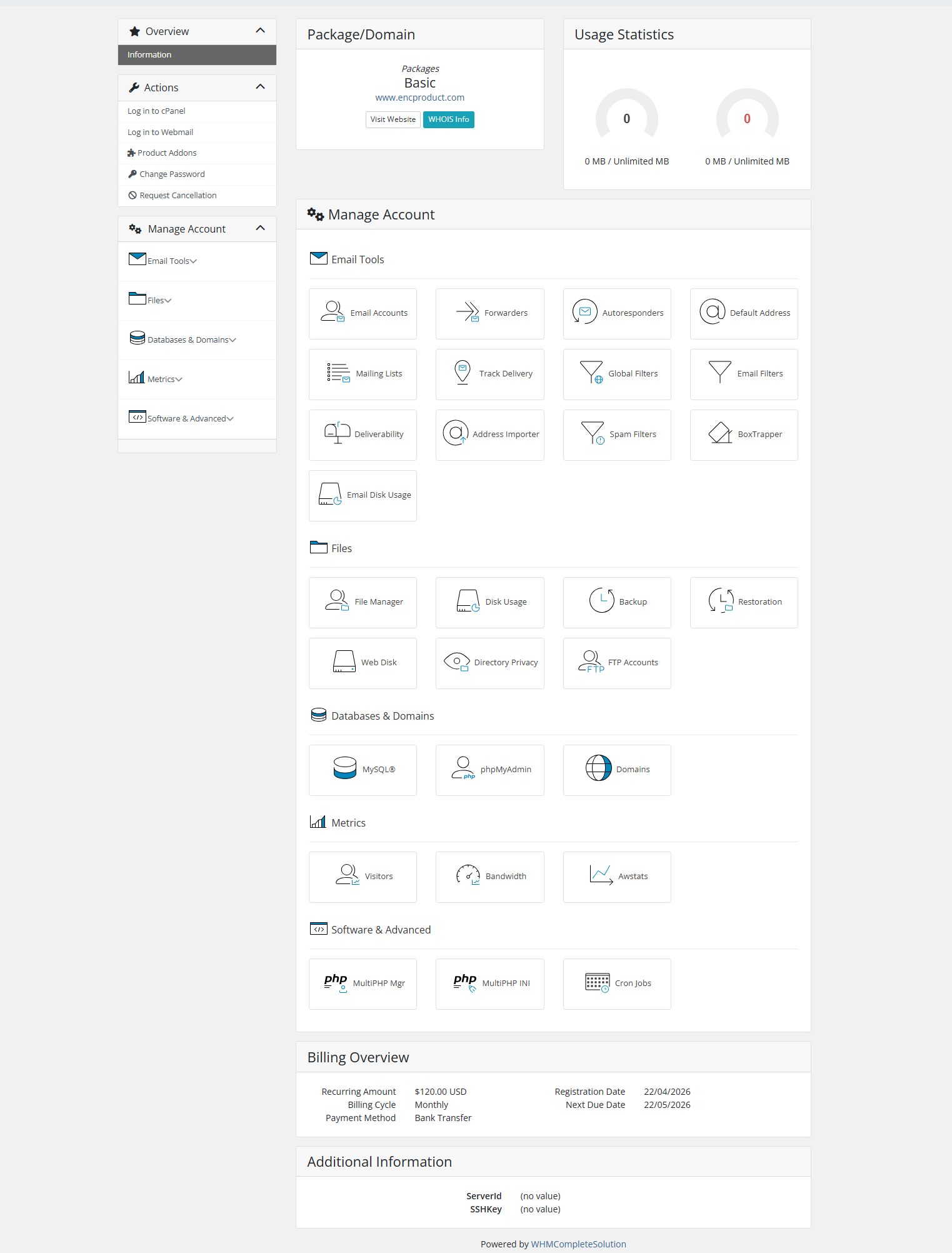
When a client clicks into their hosting service, they see a full Manage Account dashboard organized into clear sections matching the enabled features for their product.

Email Tools Section
    • Email Accounts, Forwarders, Autoresponders, Default Address, Mailing Lists, Track Delivery, Global Filters, Email Filters, Deliverability, Address Importer, Spam Filters, BoxTrapper, and Email Disk Usage all displayed as icon cards with labels
  • File Manager, Disk Usage, Backup, Restoration, Web Disk, Directory Privacy, FTP Accounts  displayed as icon cards
  • MySQL, phpMyAdmin, Domains displayed as icon cards
  • Visitors, Bandwidth, Awstats displayed as icon cards
  • MultiPHP Manager, MultiPHP INI Editor, Cron Jobs icon cards

  • Each card displays a unique icon and the feature name

  • Clicking any card opens that cPanel tool directly

  • Dashboard layout is clean, organized, and professional

  • Only enabled features for the client’s product are displayed

  • Hidden features leave no gaps or empty placeholders in the layout

General Information:

  • WHMCS Versions: Fully compatible with versions 9.0.3 to 8.7

  • PHP Versions: Supports PHP 8.4, 8.3, 8.2, and 8.1

  • Themes Supported: Works with WHMCS themes such as Six, Twenty-One, and Lagom WHMCS Client Theme

  • System Requirement: Requires ionCube Loader v13 or later

Module Price

Monthly Price: 5$.

Annually Price: 29$.

OPEN-SOURCE VERSION: 249$ One Time Price.

Improved Client Experience:

Changelog – cPanel Module
Version 1.0.0 – Initial Release
Launch
  • Seamless integration of cPanel hosting accounts with the WHMCS platform.
  • Effortless management of cPanel features (Emails, Files, Databases, Domains, etc.) directly from the WHMCS client area.
  • One-click Single Sign-On (SSO) support for instant, password-less access to cPanel and WHM.
  • Advanced UI options allow clients to easily manage complex settings like Directory Privacy, BoxTrapper, and Email Filters.
  • Built-in secure API communication ensuring safe data handling between WHMCS and cPanel.
  • Clients can view real-time disk usage, bandwidth consumption, and other hosting metrics through interactive interfaces.
  • Admins can easily control feature visibility and manage module settings directly from the WHMCS product configuration.

Per-Product Customized cPanel Access:

Scenario: A hosting business offers 3 plans: Basic, Professional, and Enterprise. Admin configures each product separately — Basic plan gets only Email Accounts and File Manager. Professional gets all Email + Files features. Enterprise gets everything including Metrics and Software tools.

Value: Sell higher-tier plans by offering more cPanel features. Clients only see what they paid for.

One-Click Email Account Management:

Scenario: A client needs to create a new email account for a team member. Instead of logging into cPanel separately, they go to WHMCS client area → click Email Accounts button from sidebar → instantly inside cPanel’s email section. Creates account in seconds.

Value: Seamless experience. Clients never ask “where do I log in?” again.

Self-Service Backup & Restore:

Scenario: A client accidentally deletes important files. Logs into WHMCS → clicks Backup button → creates a full backup. Then clicks File Restoration → restores deleted files instantly without contacting support.

Value: Zero support tickets for backup/restore requests. Clients fix mistakes themselves.

Easy PHP Version Management:

Scenario: A client installs a WordPress plugin that requires PHP 8.1. Goes to WHMCS client area → MultiPHP Manager button → switches PHP version for their domain in one click. No ticket, no waiting.

Value: Technical clients love control. Support team saves hours of “can you change my PHP version?” tickets.

See Also

Styled Text Addons
$29 One Time

Hosting Account Domain Changer

WHMPRESS Domain Changer Module enables users to automatically change their cPanel hosting account domain names directly within their client area on WHMCS. This user-friendly feature, similar
Styled Text Addons
$15 One Time

Domain Allocater For WHMCS

WHMPRESS Domain Allocator Module empowers clients to seamlessly assign any of their registered domains to selected cPanel hosting services directly from their client area interface. This
Styled Text Addons
$One Time

Bulk Pricing Update Server Module

The update_bulk_prices function updates prices for multiple products simultaneously by applying a percentage increase. It takes a dictionary of products and their prices, a percentage increase