
Conatbo Servers For WHMCS By WHMPRESS
- 30+
- V.1.3.0
- WHMCS V.9.0.4
- PHP 8.3
- 6 Months of premium support are included.
- Free module updates for 6 Months included.
- Upgrade Easily to the Open Source Version with One Click
- Exclusive Access to Premium Deals
- Request a Free Development License
- Enable or disable module logs
- User-Friendly Interface
- Cost Efficiency
- Competitive Advantage
- Access To Premium Offers
- Compatible with WHMCS 9.0.4
- We will provide free installation and configuration of the module directly on your environment, ensuring it’s fully set up and ready to use all at no additional cost.
- 6 Months of premium support are included.
- Free module updates for 6 Months included.
- Upgrade Easily to the Open Source Version with One Click
- Exclusive Access to Premium Deals
- Request a Free Development License
- Enable or disable module logs
- User-Friendly Interface
- Cost Efficiency
- Competitive Advantage
- Access To Premium Offers
- Compatible with WHMCS 9.0.4
- We will provide free installation and configuration of the module directly on your environment, ensuring it’s fully set up and ready to use all at no additional cost.
WHMPRESS Contabo Cloud Servers For WHMCS
WHMPRESS Contabo Cloud Servers For WHMCS seamlessly automates Contabo VPS provisioning and management within your WHMCS platform. Clients can easily order servers with their preferred region, plan, and OS, then manage everything from the client area — power on/off, reboot, change passwords, view network details, rebuild with a new OS, and handle snapshots (for VPS packages). You maintain full control over available features while delivering a complete self-service server experience. WHMPRESS Contabo Cloud Servers For WHMCS is an alternative to Contabo VPS modules by other developers, offering better automation, snapshot management, and seamless WHMCS integration.
Key Features of Contabo Cloud Server Module
Admin Area Features
Service Lifecycle Management:
- Create, Suspend, Unsuspend, and Terminate services directly from WHMCS.
Server Control Actions:
- Change Password, Restart, and Shut Down server instances.
Server Information:
- View Server Status, required details, and Network Information.
Snapshot Management (VPS Packages Only):
- View, Create, Delete, and Restore snapshots directly from admin area.
Rebuild Server:
- Rebuild server with chosen OS distribution.
Activity Tracking:
- View Tasks and Activity History for full transparency.
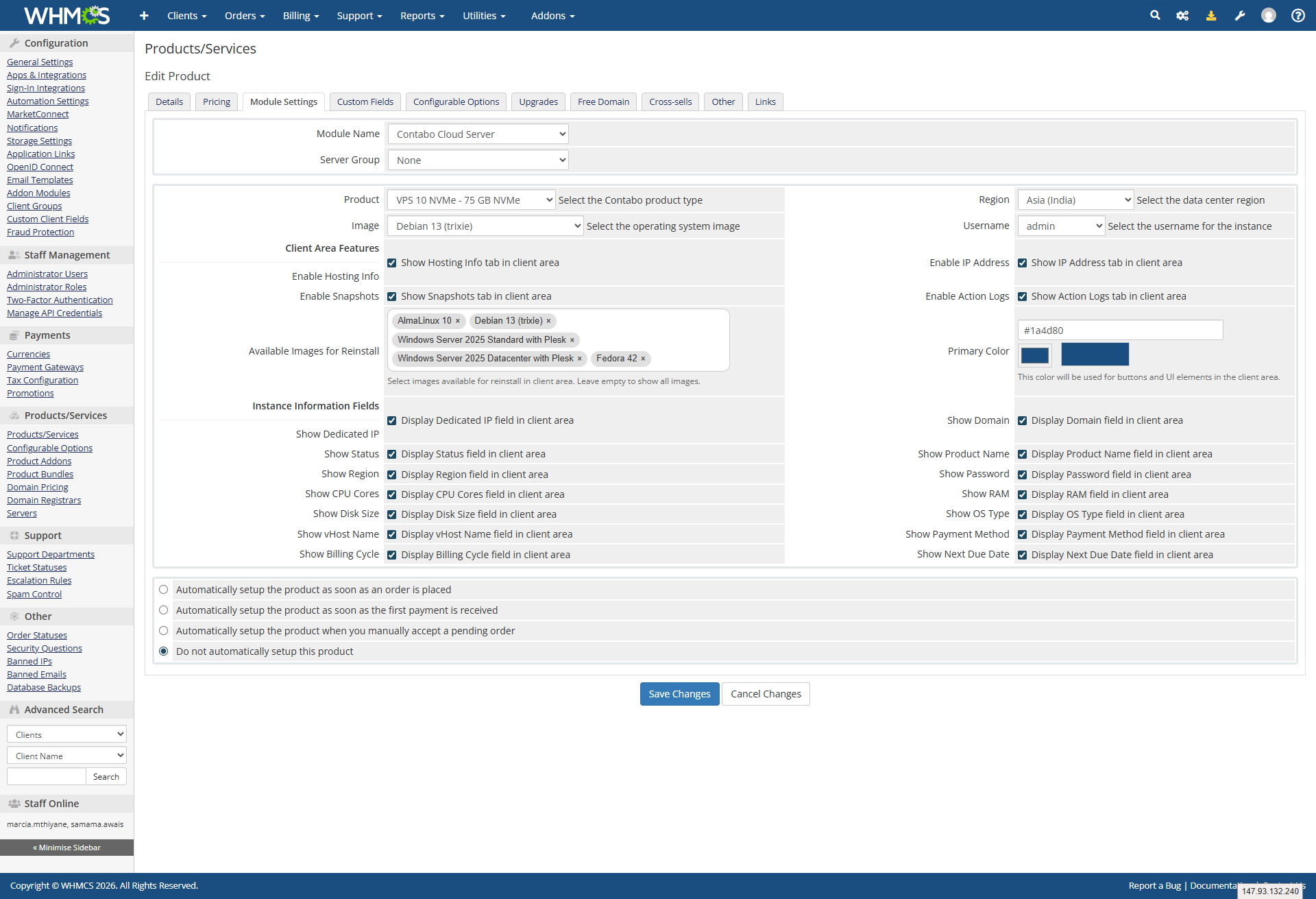
Product Configuration:
- Select Region, Plan, and OS Image during product setup.
Client Area Features
Instance Control:
- Power On, Power Off, and Reboot of instance directly from client area.
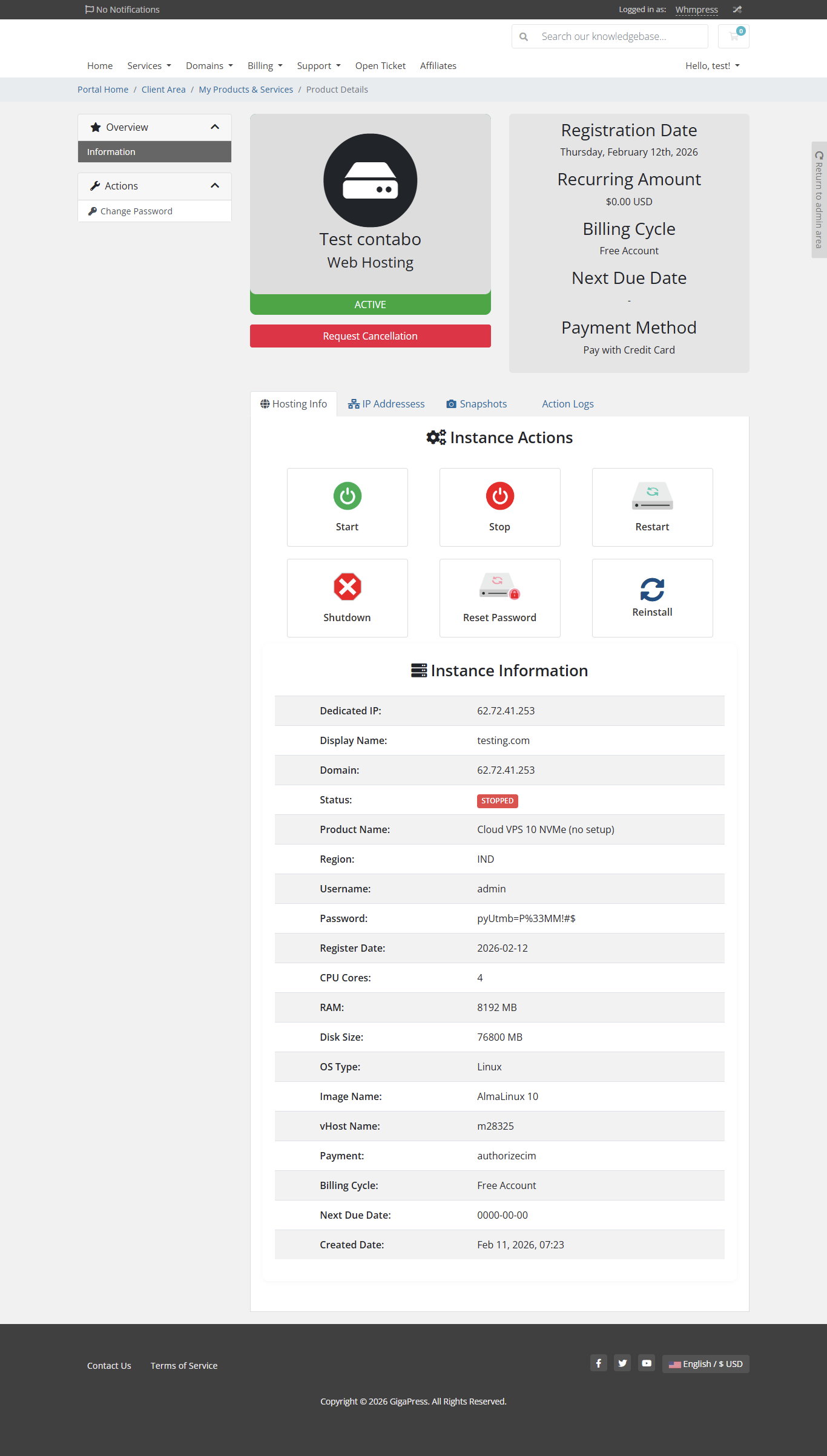
Server Information:
- View Server Status, Details, and Network Information.
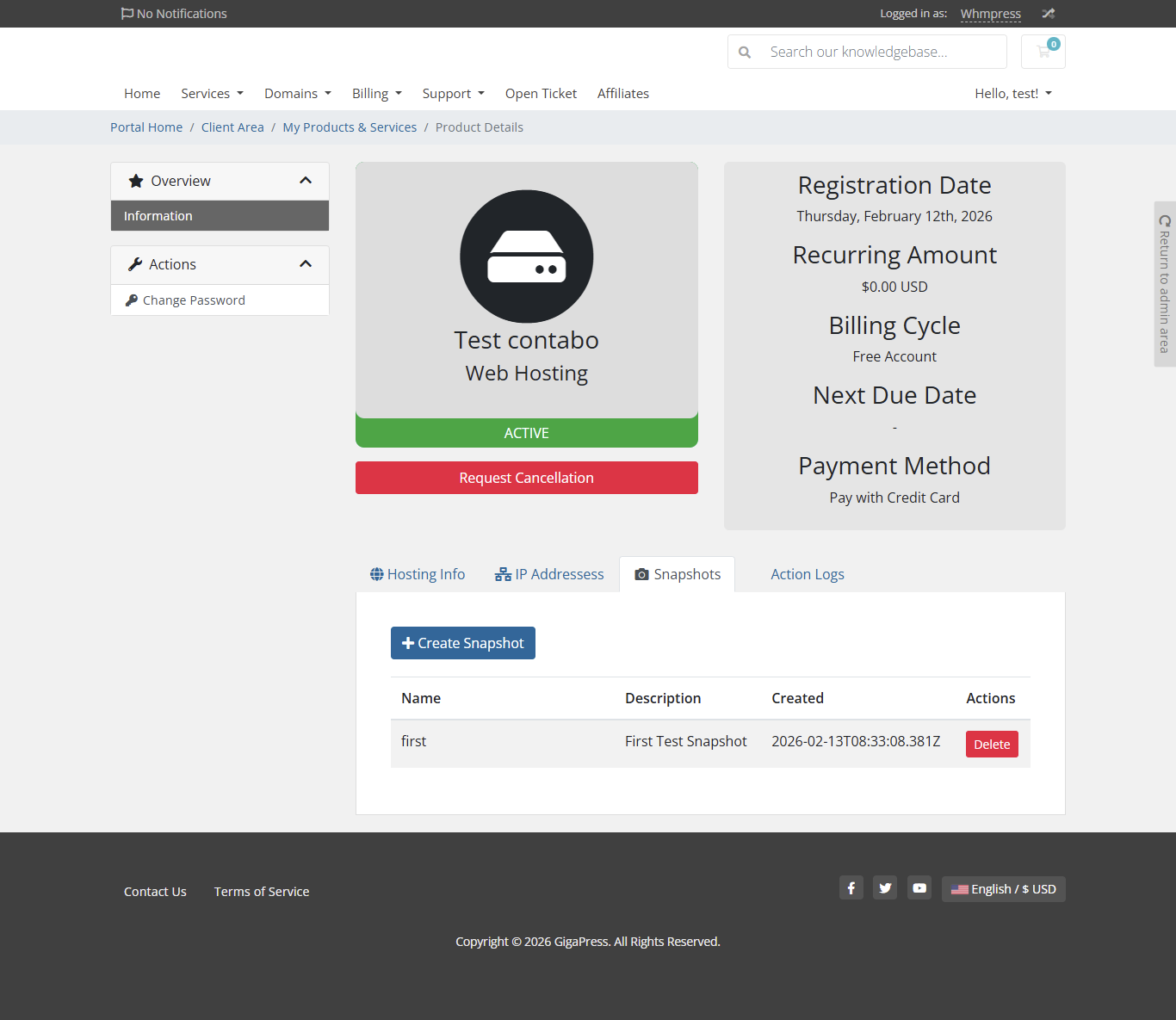
Snapshot Management (VPS Packages Only):
- View, Create, Delete, and Restore snapshots.
Rebuild Server:
- Rebuild server with chosen OS distribution.
Available Images:
- Debian 12 with Plesk
- Ubuntu 24.04 with Plesk
- AlmaLinux 10 with Plesk
- RockyLinux 10 with cPanel
- Rocky Linux 10
- AlmaLinux 10 with cPanel
- AlmaLinux 10
- Debian 13 (trixie)
- Windows Server 2025 Standard with Plesk
- Windows Server 2025 Datacenter with Plesk
- Fedora 42
- Fedora 41
- Windows Server 2025 Standard
- Windows Server 2025 Datacenter
- Rocky Linux 8 with Plesk
- Ubuntu 22.04 with cPanel
- Rocky Linux 9 with cPanel
- Ubuntu 24.04 (LTS)
- openSUSE Leap 15.6
- FreeBSD 14.0
- FreeBSD 13.2
- Rocky Linux 8 with cPanel
- AlmaLinux 9 with cPanel
- Debian 12 (bookworm)
- Rocky Linux 9
- Rocky Linux 8
- CentOS Stream 9
- Arch Linux
- Ubuntu 20.04 with cPanel
- AlmaLinux 8 with cPanel
- Debian 11 with Plesk
- Ubuntu 22.04 with Plesk
- Ubuntu 20.04 with Plesk
- Windows Server 2022 Datacenter with Plesk
- Windows Server 2019 Datacenter with Plesk
- Debian 11 (bullseye)
- AlmaLinux 8
- Windows Server 2019 Standard with Plesk
- AlmaLinux 9 with Plesk
- AlmaLinux 8 with Plesk
- Windows Server 2016 Standard with Plesk
- Windows Server 2016 Standard
- Windows Server 2016 Datacenter with Plesk
- Windows Server 2016 Datacenter
- Windows Server 2022 Standard with Plesk
- Windows Server 2022 Datacenter
- Windows Server 2019 Standard
- Windows Server 2019 Datacenter
- Windows Server 2022 Standard
- Ubuntu 22.04 (LTS)
General Information:
WHMCS Versions: Fully compatible with versions 9.0.3 to 8.7
PHP Versions: Supports PHP 8.4, 8.3, 8.2, and 8.1
Themes Supported: Works with WHMCS themes such as Six, Twenty-One, and Lagom WHMCS Client Theme
System Requirement: Requires ionCube Loader v13 or later
Module Price
Monthly Price: 7.5$.
Annually Price: 29$.
OPEN-SOURCE VERSION: $199 One Time Price.
Improved Client Experience:
- Added Configurable Options to the module.
- Added a script option in module settings.
- Allows admin to control whether the script runs during reinstall.
- Added snapshot revert functionality in the client area.
- Improved snapshot deletion process.
- Resolved issues related to snapshot creation.
- Seamless integration of Contabo Cloud servers with the WHMCS platform.
- Effortless provisioning of Hetzner Cloud virtual machines directly from the WHMCS interface.
Automated VPS Provisioning on Order
Scenario: A client orders a Contabo VPS from your WHMCS store. Module automatically provisions the server with client’s chosen region, plan, and OS (e.g., Ubuntu 24.04 LTS). Login credentials sent via email instantly.
Value: Zero manual work. Client gets their server minutes after ordering.
Client Self-Service Snapshot Management
Scenario: A client wants to test a major software update. Logs into WHMCS client area → Snapshots section (VPS only) → creates a snapshot before updating. If something breaks, restores from snapshot instantly.
Value: Complete disaster recovery self-service. No “can you restore my server?” tickets.
One-Click OS Rebuild with Multiple Images
Scenario: A client wants to switch from Ubuntu to Windows Server 2025 Standard. Logs into WHMCS → Rebuild Server → selects Windows Server 2025 Standard from 50+ available images → module rebuilds server automatically.
Value: OS changes without admin involvement. Clients have full control over their server environment.
Complete Server Control from Client Area
Scenario: A client’s server becomes slow. Logs into WHMCS → views Network Information and Server Status → sees high load → clicks Reboot → server restarts. Also can Power On/Off as needed.
Value: Clients troubleshoot and fix issues themselves. Support tickets reduced dramatically.
Admin Activity Tracking & Full Lifecycle Control
Scenario: Admin needs to audit what happened to a server. Goes to Activity Tracking section → sees full task history (who rebooted, when snapshot was created, etc.). Also can Suspend/Unsuspend/Terminate from admin panel.
Value: Complete transparency and control. No mystery actions on client servers.
Sign In to Review
Verify your WHMPRESS account credentials to leave a review.
Customer Reviews
No reviews yet. Be the first to share your experience!
No reviews match the selected filter.